Thursday, 13 March 2025

PIAGGIO PGQ 168 ECU IMMO Off by OBDSTAR X300 Classic G3

This post will guide you in using the OBDSTAR X300 Classic G3 Programming tool to disable the immobilizer on a Piaggio motorcycle.


Repair Background:

When encountering issues such as a damaged key chip, signal interference, or anti-theft module failure that prevent the vehicle from starting, you can disable the immobilizer function and use a temporary blade key to start the car.

You can also disable the immobilizer function during vehicle circuit repairs or ECU debugging to avoid interruptions caused by anti-theft lockouts.


The tools we need:

Key Master G3

High-power DC regulated power supply

Main cable

ECU Jumper

P004 adapter

PIAGGIO 168 ECU

piaggio-pgq-168-ecu-immo-off-by-obdstar-x300-classic-g3-1

Before proceeding, you need to upgrade the software to the latest version.


Select [IMMO] >> [ MOTO] >> [PIAGGIO] >> [PIAGGIO V40.31] >> [PIAGGIO]

Slect [Manual Select System] >> [PGQ16/PGV18]

piaggio-pgq-168-ecu-immo-off-by-obdstar-x300-classic-g3-2

piaggio-pgq-168-ecu-immo-off-by-obdstar-x300-classic-g3-3

Open the [Guide] section and carefully read the function instructions, menu description, operation instructions, and connection method.

Follow the wiring diagram for the connection.

piaggio-pgq-168-ecu-immo-off-by-obdstar-x300-classic-g3-4

piaggio-pgq-168-ecu-immo-off-by-obdstar-x300-classic-g3-5

After completing the connection, read the ECU information to verify its accuracy.

Proceed to read the MAP data and save it after reading.

piaggio-pgq-168-ecu-immo-off-by-obdstar-x300-classic-g3-6

piaggio-pgq-168-ecu-immo-off-by-obdstar-x300-classic-g3-7

piaggio-pgq-168-ecu-immo-off-by-obdstar-x300-classic-g3-8

piaggio-pgq-168-ecu-immo-off-by-obdstar-x300-classic-g3-9

Tap [IMMO-ON/IMMO-OFF] (Note: This function requires an internet connection to execute.)

Please back up MAPS before changing the IMMO status!

Current IMMO status: ON

CRC check result: success

Turn off the immobilizer?

Click "Yes" to continue.

Operation success.

piaggio-pgq-168-ecu-immo-off-by-obdstar-x300-classic-g3-10

piaggio-pgq-168-ecu-immo-off-by-obdstar-x300-classic-g3-11

piaggio-pgq-168-ecu-immo-off-by-obdstar-x300-classic-g3-12

Above is using OBDSTAR X300 Classic G3 to disable the immobilizer on a Piaggio motorcycle.

For more details, please refer to the video:


www.obd2shop.co.uk

Wednesday, 5 March 2025

Renault Delphi DCM3.4 ECU Mileage Calibration by OBDSTAR X300 Classic G3

This post will show you how to use OBDSTAR X300 Classic G3 to perform the mileage recalibration function on the Renault Delphi DCM3.4 engine ECU.


The tools we need:

X300 Classic G3

High-power DC regulated power supply

Main cable

ECU clone jumper

P004 adapter

Renault Delphi DCM3.4 engine ECU

renault-ecu-mileage-calibration-by-obdstar-x300-classic-g3-1

Before proceeding, you need to upgrade the software to the latest version.


Open [ODO Meter], and in the top right corner, enter a keyword to select quickly.

Then we click [RENAULT/DACIA] >> [RENAULT/DACIA V41.16] >> [ECM] >> [RENAULT] >> [DELPHI] >> [DCM3.4]

Open the [Guide] section and carefully read the menu description and special note.

renault-ecu-mileage-calibration-by-obdstar-x300-classic-g3-2

renault-ecu-mileage-calibration-by-obdstar-x300-classic-g3-3

renault-ecu-mileage-calibration-by-obdstar-x300-classic-g3-4

renault-ecu-mileage-calibration-by-obdstar-x300-classic-g3-5

First, open the P004 adapter and check the [ECU Info.]

Check [Mlieage Read]

Tap [Mileage Calibration] and input the mileage as you need.

renault-ecu-mileage-calibration-by-obdstar-x300-classic-g3-6

renault-ecu-mileage-calibration-by-obdstar-x300-classic-g3-7

renault-ecu-mileage-calibration-by-obdstar-x300-classic-g3-8

renault-ecu-mileage-calibration-by-obdstar-x300-classic-g3-9

Mileage repair successful.

According to the prompt, we need to unplug one IG(ignition) wire and wait one minute before reconnecting it.

renault-ecu-mileage-calibration-by-obdstar-x300-classic-g3-10

Video guides:

www.obd2shop.co.uk


Monday, 24 February 2025

OBDSTAR MT203 Geteway Simulation & CAN Drive Function Demo

Today we'll demonstrate the function of OBDSTAR MT203 CAN Driver/Gateway Simulator. OBDSTAR MT203 allows us to diagnose modules individually on a workbench, eliminating the need to connect to the original vehicle gateway or reinstall the module back into the vehicle. It is versatile and can handle multiple ECUs, perform diagnostics, and read fault codes.


Kia Sorento Instrument Gateway Simulation


Connect the power supply and the ECU, and then connect the Bluetooth connector.


There are gateway and CAN drive functions on OBDSTAR MT203.

The gateway function supports automatic scanning of standard CAN and fault-tolerant CAN. But does not support automatic identification of CAN FD. Users can manually select standard CAN, fault-tolerant CAN, CAN FD, etc.


Common baud rates are available for quick selection. If don't have one, the custom baud rates can be set. The diagnostic tool defaults to 500K.


This 2020 Kia Sorento instrument uses the CAN FD protocol.

So find the protocol and select 2M baud rate.

The cycling of the 3 dots indicates a successful simulation.


You can now use diagnostic tools like LAUNCH X431 to read ECU information and fault codes, enabling off-vehicle module diagnostics.

obdstar-mt203-geteway-simulation-can-drive-1

obdstar-mt203-geteway-simulation-can-drive-2

obdstar-mt203-geteway-simulation-can-drive-3

obdstar-mt203-geteway-simulation-can-drive-4

obdstar-mt203-geteway-simulation-can-drive-5

obdstar-mt203-geteway-simulation-can-drive-6

Mitsubishi airbag ECU Gateway Simulation 

The Mitsubishi airbag ECU uses fault-tolerant CAN, which can be manually selected or automatically recognized.

Press "ENT" to scan automatically, and the scanned ECU is 83K.

The cycling of the 3 dots indicates a successful simulation.


You can now use the diagnostic tool to diagnose the airbag and read fault codes, etc.


If the automatic identification fails, manually select fault-tolerant CAN and choose from common baud rates. 

If don't match, select custom settings while keeping the diagnostic tool at 500K, and setting the ECU to 83K.

Press "ENT" and proceed to read fault codes for module diagnosis.

obdstar-mt203-geteway-simulation-can-drive-7

obdstar-mt203-geteway-simulation-can-drive-8

obdstar-mt203-geteway-simulation-can-drive-9

obdstar-mt203-geteway-simulation-can-drive-10

obdstar-mt203-geteway-simulation-can-drive-11

CAN Drive Function

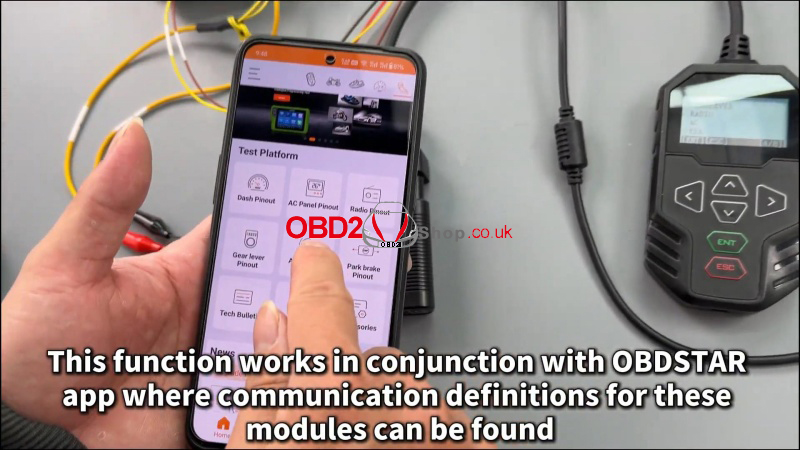
Besides gateway simulation, there's also a CAN drive function to test common modules like gear lever, radio, air conditioning, and EBA system. 


This function works in conjunction with the OBDSTAR app where communication definitions for these modules can be found.

obdstar-mt203-geteway-simulation-can-drive-12

obdstar-mt203-geteway-simulation-can-drive-13

www.obd2shop.co.uk


Wednesday, 29 January 2025

HYUNDAI CPEGD3201 ECM Data Read and Write By OBDSTAR DC706

In this post, we will share the data read and write operations for the HYUNDAI CPEGD3.20.1 ECM using OBDSTAR DC706.


Items we need:

OBDSTAR DC706

12V Power Supply

Main Cable

ECU Clone Jumper

MP001 Programmer

HYUNDAI CPEGD3.20.1ECM


hyundai-ecm-data-read-write-by-obdstar-dc706-1

Procedure:


Make sure to update the software to the latest version before we get started.

Tap [ECU Flasher] >> [ECM] >> [ECM V31.35]

Enter the menu page and search for the module in the upper right corner to find the corresponding options quickly.


hyundai-ecm-data-read-write-by-obdstar-dc706-2

hyundai-ecm-data-read-write-by-obdstar-dc706-3

hyundai-ecm-data-read-write-by-obdstar-dc706-4

Tap [Guide] and carefully read the operation instructions and connection methods.

Select the appropriate adapter. For this session, we are using the MP001 multifunctional programmer.


hyundai-ecm-data-read-write-by-obdstar-dc706-5

hyundai-ecm-data-read-write-by-obdstar-dc706-6

Confirm whether the module appearance is consistent.


hyundai-ecm-data-read-write-by-obdstar-dc706-7


Now refer to the wiring diagram to make the connection.

After connecting, tap [Start].

Now make an ECU connection.


hyundai-ecm-data-read-write-by-obdstar-dc706-8

hyundai-ecm-data-read-write-by-obdstar-dc706-9

hyundai-ecm-data-read-write-by-obdstar-dc706-10

hyundai-ecm-data-read-write-by-obdstar-dc706-12


Make data backup now.

Click [Read MAPS (TC277TP)].

Read successfully.

Save the document, the file names can be customized.

Finish.


hyundai-ecm-data-read-write-by-obdstar-dc706-13

hyundai-ecm-data-read-write-by-obdstar-dc706-14

A CS label in the upper right corner indicates that clone data verification is supported.

Click [Write MAPS (TC277TP)], and choose [Load external data].

Before writing the data, the device will ask if you need to verify the data. Verification is only required if the data has been modified; cloning does not require verification.

Write MAPS successfully.


hyundai-ecm-data-read-write-by-obdstar-dc706-15

hyundai-ecm-data-read-write-by-obdstar-dc706-16

hyundai-ecm-data-read-write-by-obdstar-dc706-17

hyundai-ecm-data-read-write-by-obdstar-dc706-18

That's all for the data read and write operations for the HYUNDAI CPEGD3.20.1 ECM using OBDSTAR DC706.

www.obd2shop.co.uk

Monday, 27 January 2025

How to Register OBDSTAR Iscan Pro Series Marine Scanner

OBDSTAR iScan Pro Series Marine Scanner is a powerful device that provides accurate diagnostics and troubleshooting for marine engines and systems. In this article, we will guide you through registering your OBDSTAR iScan Pro Series Marine Scanner, helping you get started with confidence and ease.


Registration Procedure:


Tap the [Personal Center] icon in the DP menu, then the login interface will be shown.


how-to-register-obdstar-iscan-pro-marine-scanner-1

Select the [Register] button in the lower right corner and proceed to the user registration interface.


Fill in the information in each field. After that, you will be prompted with "Registered successfully!"


how-to-register-obdstar-iscan-pro-marine-scanner-2

how-to-register-obdstar-iscan-pro-marine-scanner-3

how-to-register-obdstar-iscan-pro-marine-scanner-4

Tap [Login now!]


how-to-register-obdstar-iscan-pro-marine-scanner-5

If you forget your password, you can select [Forgot password], then fill in the necessary information in the Password Recovery pop-up window, and you will be able to log in with your new password.


how-to-register-obdstar-iscan-pro-marine-scanner-6

The above is the registration process for the OBDSTAR Iscan Pro Series Marine Scanner. I hope it is helpful to you. For more information and services, please visit www.obd2shop.co.uk.

Thursday, 9 January 2025

OBDSTAR MOTOMASTER vs. MS80 Motorcycle Tool Comparison

OBDSTAR has a newly released OBDSTAR MOTOMASTER Motocycle Scanner. How is it different from the OBDSTAR MS80? Here, we are comparing them from hardware specifications.


MOTOMASTER vs MS80

obdstar-motomaster-vs-ms80-motocycle-tool

1. Operating System

MOTOMASTER: Android 11

MS80: Android 5.1.1


2. OTA, Screen Recording & Wireless Screen Casting

MOTOMASTER: Supports all three (OTA, screen recording, wireless screencasting).

MS80: Does not support any of these.


3. CPU

MOTOMASTER: Quad-core 64-bit Cortex-A55 (2.0GHz, newer architecture).

MS80: Quad-core ARM Cortex A9 (1.4GHz, older architecture).


4. Battery

MOTOMASTER: 9000mAh (larger capacity).

MS80: 3700mAh (smaller capacity).


5. Storage Capacity

MOTOMASTER: 4GB RAM + 64GB storage.

MS80: 1GB RAM + 32GB storage.


6. Display

MOTOMASTER: 8.0-inch fully laminated, sunlight-readable screen.

MS80: 8.0-inch standard screen.


7. Camera

MOTOMASTER: Rear 800W pixels, autofocus.

MS80: Rear 500W pixels, no autofocus.


8. Bluetooth

MOTOMASTER: Bluetooth 5.0.

MS80: No Bluetooth support.


9. External Interfaces

MOTOMASTER: RJ-45, HDMI, TYPE-A, TYPE-C.

MS80: Only TYPE-A.


10. WiFi

MOTOMASTER: Dual-band (2.4GHz/5GHz).

MS80: Single-band (2.4GHz).


11. Vehicle Communication Interface (VCI)

MOTOMASTER: Built-in CANFD, DOIP, Low-Speed CAN, and other protocols.

MS80: Requires external adapters for CANFD and other protocols.


12. RFID

MOTOMASTER: Built-in RFID.

MS80: Requires external hardware (P001).


13. Remote Test

MOTOMASTER: Built-in support.

MS80: Requires external hardware (RT100).


Summary

MOTOMASTER offers a significantly better operating system, hardware, connectivity, and functionality compared to the MS80, which lacks many features and relies on external adapters for extended capabilities.


www.obd2shop.co.uk

How to Read and Write MB Benz Bosch MP4 Data with OBDSTAR ECU MASTER

OBDSTAR ECU MASTER supports reading and writing data for the MB Benz Bosch MP4 (TCM) equipped with MPC5566 and 95640. This guide explains t...